VPC on Linux

How to Build a Realistic Linux VPC Lab with Bash, Bridges, Namespaces, and iptables
Introduction
Ever wanted to experiment with AWS-style VPC networking—subnets, NAT, peering, security groups—but locally, with no cloud bill? In this guide, I'll show you how to build a realistic, scriptable VPC lab on any Linux machine using only Bash, Linux bridges, network namespaces, and iptables. You'll get modular scripts, environment variable and flag support, and real isolation between your "cloud" workloads.
What You'll Build
VPCs as Linux bridges
Subnets as network namespaces
NAT for public subnets
VPC peering with CIDR restrictions
Security groups via JSON firewall policies
Full automation with flags, env vars, and modular test scripts
Topography
Linux Host
  |
  +-- vpc-vpc1-br
  |     |--- ns1 (public, NAT)
  |     |--- ns2 (private)
  |
  +-- vpc-vpc2-br
        |--- ns3 (public, NAT)
Architecture
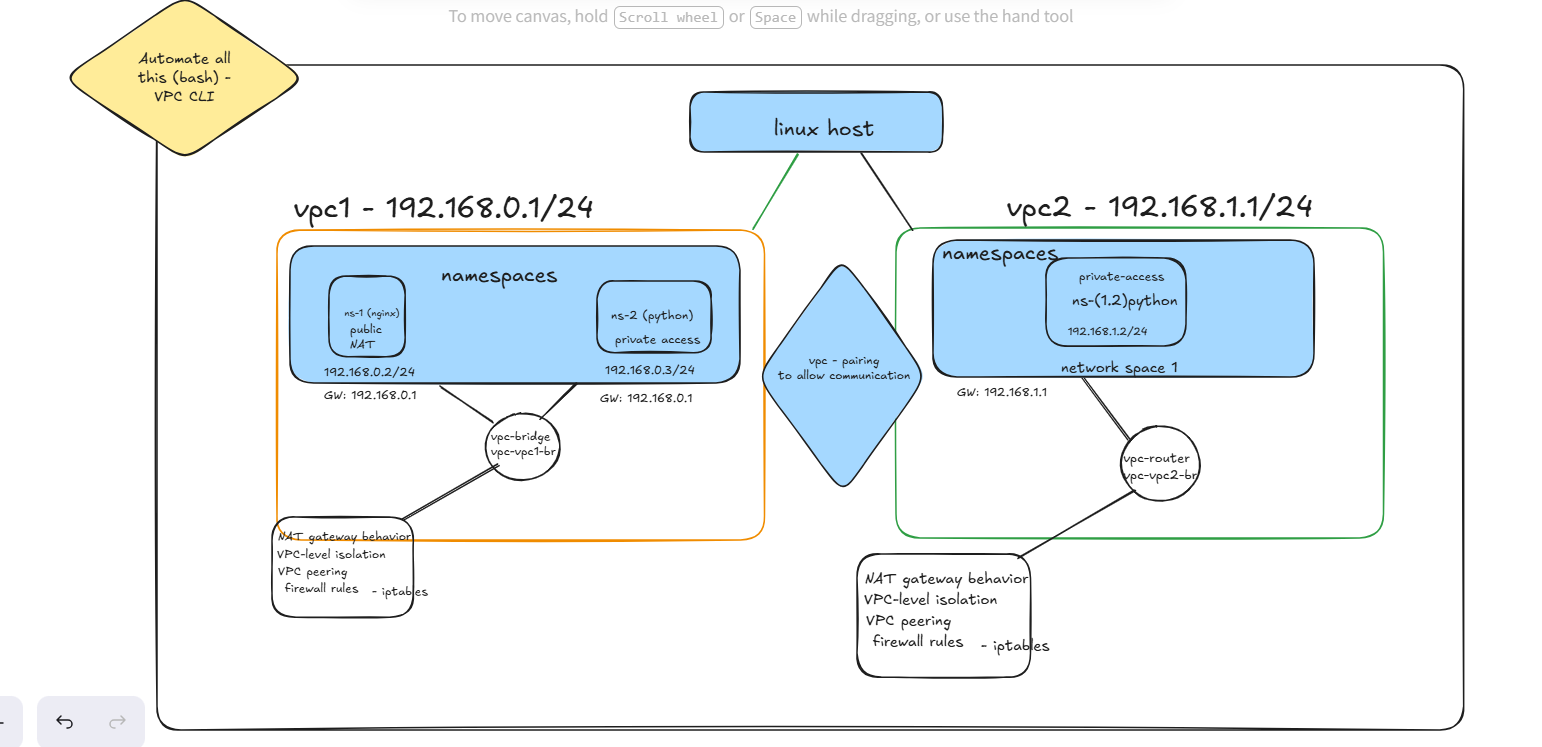
vpcctl.sh: A Beginner-Friendly Linux VPC Lab
Easily build your own mini-cloud on any Linux machine—no AWS account or advanced networking knowledge required! With this project, you can:
Create and delete virtual networks (VPCs)
Add subnets and connect workloads
Enable internet access for public subnets
Secure workloads with simple firewall rules from a JSON file
Connect networks together and control who can talk to whom
Use easy command-line flags, environment variables, or simple scripts
Create VPC
# Create a VPC (Linux bridge)
create_vpc() {
    local name=${VPC_NAME:-$1}
    local cidr_block=${CIDR_BLOCK:-$2}
    local br="vpc-$name-br"

    # Check if bridge already exists
    if ip link show "$br" >/dev/null 2>&1; then
        echo "Error: Bridge '$br' already exists" >&2
        return 1
    fi

    # Create bridge if it doesn't exist
    run ip link add name "$br" type bridge

    # Assign IP if not already assigned
    if ! ip -c addr show dev "$br" | grep "$cidr_block"; then
        run ip addr add "$cidr_block" dev "$br"
    fi

    run ip link set "$br" up

    # Enable IP forwarding (idempotent)
    sysctl -w net.ipv4.ip_forward=1

    # Set up NAT for this bridge (for public subnets)
    # The user must specify which subnets are public when creating namespaces.
    # Example usage: create_ns <vpc> <ns> <ip_cidr> <gateway_cidr> <bridge> <public|private>

    echo "[SUCCESS] VPC '$name' created with CIDR '$cidr_block' (bridge: '$br')"
}
Command:
sudo ./vpcctl.sh create_vpc -v vpc1 -c 192.168.1.0/24
sudo ./vpcctl.sh create_vpc -v vpc2 -c 192.168.2.0/24
Create Namespace on VPC
# Create namespace and attach to VPC
create_ns() {
    local vpc=${VPC_NAME:-$1}
    local namespace=${NS_NAME:-$2}
    local ipcidr=${CIDR_BLOCK:-$3}
    local gateway_cidr=${GW1:-$4}
    local dev="veth-$namespace"
    local peer="veth-$namespace-br"
    local br=${BR1:-$5}
    local subnet_type=${SUBNET_TYPE:-$6}  # 'public' or 'private'
    local nat_enabled=${NAT_ENABLED:-$7}
    local internet_interface=${INTERNET_INTERFACE:-$8}

    # Check if namespace already exists
    if ip netns list | grep -qw "$namespace"; then
        echo "Error: Namespace '$namespace' already exists" >&2
        return 1
    fi

    # Create namespace
    run ip netns add "$namespace"
    echo "[SUCCESS] Namespace '$namespace' created and attached to bridge '$br' with IP '$ipcidr'"

    # Create veth pair
    run ip link add "$dev" type veth peer name "$peer"

    # Move veth to namespace
    run ip link set "$dev" netns "$namespace"

    # Attach peer to bridge
    run ip link set "$peer" master "$br"
    run ip link set "$peer" up

    # Assign IP inside namespace
    run ip netns exec "$namespace" ip addr add "$ipcidr" dev "$dev"
    run ip netns exec "$namespace" ip link set "$dev" up
    run ip netns exec "$namespace" ip link set lo up

    # Set default route
    local gateway_ip=$(echo "$gateway_cidr" | cut -d'/' -f1)
    run ip netns exec "$namespace" ip route add default via "$gateway_ip" dev "$dev"


    # Enable NAT if nat_enabled is true
    if [ "$nat_enabled" == "true" ]; then
        public_ip=$(ip -o -4 addr show dev "$br" | awk '{print $4}' | cut -d'/' -f1)
        if [ -n "$public_ip" ]; then
            iptables -t nat -C POSTROUTING -s "$ipcidr" -o "$br" -j SNAT --to-source "$public_ip" 2>/dev/null || \
            iptables -t nat -A POSTROUTING -s "$ipcidr" -o "$br" -j SNAT --to-source "$public_ip"
            echo "Static SNAT enabled for $namespace ($ipcidr → $public_ip)"
        else
            echo "Error: Could not determine public IP for $internet_interface" >&2
        fi
    fi

}
Command:
sudo ./vpcctl.sh create_ns -v vpc1 -n ns1 -c 192.168.1.10/24 -g 192.168.1.1/24 -b vpc-vpc1-br -t public -a true -i eth0
sudo ./vpcctl.sh create_ns -v vpc1 -n ns2 -c 192.168.1.20/24 -g 192.168.1.1/24 -b vpc-vpc1-br -t private -a false -i eth0
sudo ./vpcctl.sh create_ns -v vpc2 -n ns3 -c 192.168.2.10/24 -g 192.168.2.1/24 -b vpc-vpc2-br -t public -a true -i eth0
List all VPC and Namespace:
list_state() {
    echo "Listing all VPCs and namespaces"
    ip netns list
    ip link show | awk -F ': ' '{print $2}' | grep -E 'vpc-.*-br'
}
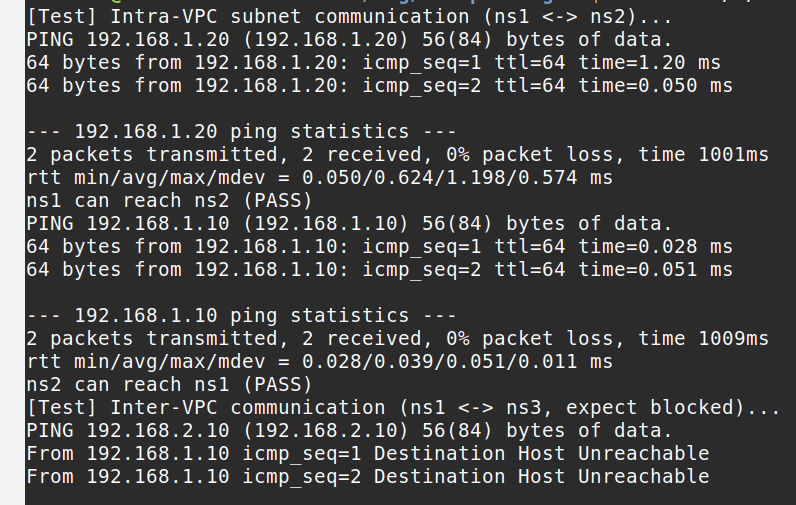
Testing connectivity with log
log "[Test] Intra-VPC subnet communication (ns1 <-> ns2)..."
ip netns exec ns1 curl -s --connect-timeout 2 http://192.168.1.20:8080 && log "ns1 can reach ns2 (PASS)" || log "ns1 cannot reach ns2 (FAIL)"
ip netns exec ns2 curl -s --connect-timeout 2 http://192.168.1.10:8080 && log "ns2 can reach ns1 (PASS)" || log "ns2 cannot reach ns1 (FAIL)"

log "[Test] Inter-VPC communication (ns1 <-> ns3, expect blocked)..."
ip netns exec ns1 curl -s --connect-timeout 2 http://192.168.2.10:8080 && log "ns1 can reach ns3 (FAIL)" || log "ns1 cannot reach ns3 (PASS)"
ip netns exec ns3 curl -s --connect-timeout 2 http://192.168.1.10:8080 && log "ns3 can reach ns1 (FAIL)" || log "ns3 cannot reach ns1 (PASS)"
INTRA VPC || INTER VPC TEST CONNECTIVITY RESULT
ns1 -
VPC Peering
set -euo pipefail

log() { echo "$1"; }

log "[Test] Peering VPCs with CIDR restrictions (192.168.1.0/24 <-> 192.168.2.0/24)..."
bash vpcctl.sh peer_vpcs -v vpc1 -w vpc2 -c 192.168.1.0/24 -d 192.168.2.0/24
sleep 1
log "[Test] After VPC peering (only allowed subnets should communicate)..."
ip netns exec ns1 curl -s --connect-timeout 2 http://192.168.2.10:8080 && log "ns1 can reach ns3 after VPC peering (PASS)" || log "ns1 cannot reach ns3 after VPC peering (FAIL)"
ip netns exec ns3 curl -s --connect-timeout 2 http://192.168.1.10:8080 && log "ns3 can reach ns1 after VPC peering (PASS)" || log "ns3 cannot reach ns1 after VPC peering (FAIL)"

log "[Test] Negative: ns2 (192.168.1.20) should NOT reach ns3 after peering..."
ip netns exec ns2 curl -s --connect-timeout 2 http://192.168.2.10:8080 && log "ns2 can reach ns3 (FAIL: should be blocked)" || log "ns2 cannot reach ns3 (PASS: blocked as expected)"
Add and Remove Firewall rules
# add_sg and remove_sg retain positional args for simplicity
add_sg(){
    local vpc=$1
    local ns=$2
    local cidr=$3
    local policy_file=$4

    rules=$(awk -v cidr="$cidr" 'BEGIN{RS="{";FS=","} /subnet/ && $0 ~ cidr {for(i=1;i<=NF;i++){if($i~"ingress"){gsub(/\[|\]|}/,"",$i); print $i}}}' "$policy_file")

    for rule in $rules; do
    port=$(echo "$rule" | grep -o '"port"[ ]*:[ ]*[^,}]*' | cut -d: -f2 | tr -d ' "')
    proto=$(echo "$rule" | grep -o '"protocol"[ ]*:[ ]*[^,}]*' | cut -d: -f2 | tr -d ' "')
    action=$(echo "$rule" | grep -o '"action"[ ]*:[ ]*[^,}]*' | cut -d: -f2 | tr -d ' "')
    if [ "$action" == "allow" ]; then
        ip netns exec "$ns" iptables -C INPUT -p "$proto" --dport "$port" -j ACCEPT 2>/dev/null || \
        ip netns exec "$ns" iptables -A INPUT -p "$proto" --dport "$port" -j ACCEPT
    elif [ "$action" == "deny" ]; then
        ip netns exec "$ns" iptables -C INPUT -p "$proto" --dport "$port" -j DROP 2>/dev/null || \
        ip netns exec "$ns" iptables -A INPUT -p "$proto" --dport "$port" -j DROP
    fi
    done

}

remove_sg(){
    local vpc=$1
    local ns=$2
    local cidr=$3
    local policy_file=$4

    rules=$(awk -v cidr="$cidr" 'BEGIN{RS="{";FS=","} /subnet/ && $0 ~ cidr {for(i=1;i<=NF;i++){if($i~"ingress"){gsub(/\[|\]|}/,"",$i); print $i}}}' "$policy_file")

    for rule in $rules; do
    port=$(echo "$rule" | grep -o '"port"[ ]*:[ ]*[^,}]*' | cut -d: -f2 | tr -d ' "')
    proto=$(echo "$rule" | grep -o '"protocol"[ ]*:[ ]*[^,}]*' | cut -d: -f2 | tr -d ' "')
    action=$(echo "$rule" | grep -o '"action"[ ]*:[ ]*[^,}]*' | cut -d: -f2 | tr -d ' "')
    if [ "$action" == "allow" ]; then
        ip netns exec "$ns" iptables -C INPUT -p "$proto" --dport "$port" -j ACCEPT 2>/dev/null || \
        ip netns exec "$ns" iptables -D INPUT -p "$proto" --dport "$port" -j ACCEPT
    elif [ "$action" == "deny" ]; then
        ip netns exec "$ns" iptables -C INPUT -p "$proto" --dport "$port" -j DROP 2>/dev/null || \
        ip netns exec "$ns" iptables -D INPUT -p "$proto" --dport "$port" -j DROP
    fi
    done
}
Project Summary
Purpose: Lets you build and experiment with cloud-style VPCs, subnets, NAT, peering, and firewall rules on any Linux machine using Bash and standard tools.
Key Features:
Create/delete virtual networks (VPCs) and subnets (namespaces)
NAT for public subnets
Peer VPCs and restrict traffic by CIDR
Apply firewall rules from a JSON file
Automate everything with flags, env vars, or scripts
Beginner-Friendly:
Clear help, usage, and error messages
No advanced networking knowledge required
Modular test scripts and .env-example in
For Automation and scripting https://github.com/okekolawolesunday009/devops-stage-4
